Showcase Interactive Models
The models presented below showcase some of the other modelling capabilities of our software.
Biprism
We can combine three biprism components created in our software to make an interactive version of the microscope setup presented in this paper from tonamura in 2012 (See Bibliography).

Model TEM
Adopting a qualitative schematic found here for a JEOL 2010F Transmission Electron Microscope, we can recreate an interactive alignment model of this microscope using the components we have created. The code which creates this model is located in the python script ‘’model_tem_example_pyqt.py’’
import sys
from PyQt5.QtWidgets import QApplication
from temgymbasic.run import run_pyqt
from temgymbasic.model import Model
from temgymbasic import components as comp
def main():
    components = [comp.Lens(name='Electrostatic Lens', z=3, f=-0.2),
                  comp.DoubleDeflector(name='Gun Beam Deflectors',
                                       z_up=2.8, z_low=2.7),
                  comp.Lens(name='1st Condenser Lens', z=2.6, f=-0.1),
                  comp.Lens(name='2nd Condenser Lens', z=2.5, f=-0.1),
                  comp.Aperture(name='Condenser Aperture', z=2.3,
                                aperture_radius_inner=0.05),
                  comp.Quadrupole(name='Condenser Stig', z=2.2),
                  comp.DoubleDeflector(
                      name='Condenser Deflectors', z_up=2.1, z_low=2.0),
                  comp.Lens(name='Condenser Mini Lens', z=1.8, f=-0.2),
                  comp.Aperture(name='Objective Aperture', z=1.7,
                                aperture_radius_inner=0.1),
                  comp.Lens(name='Objective Lens', z=1.5, f=-0.2),
                  comp.Quadrupole(name='Objective Stig', z=1.4),
                  comp.Lens(name='Objective Mini Lens', z=1.3, f=-0.2),
                  comp.DoubleDeflector(name='Image Shifts', z_up=1.1, z_low=1.0),
                  comp.Aperture(name='Selected Area Aperture',
                                z=0.9, aperture_radius_inner=0.1),
                  comp.Quadrupole(name='Intermediate Lens Stigmator', z=0.8),
                  comp.Lens(name='1st Intermediate Lens', z=0.7, f=-0.1),
                  comp.Lens(name='2nd Intermediate Lens', z=0.6, f=-0.1),
                  comp.Lens(name='3rd Intermediate Lens', z=0.5, f=-0.1),
                  comp.DoubleDeflector(
                      name='Projector Lens Deflectors', z_up=0.4, z_low=0.3),
                  comp.Lens(name='Projector Lens', z=0.2, f=-0.1)
                  ]

    model_ = Model(components, beam_z=3.5, beam_type='point',
                   num_rays=256, beam_semi_angle=0.25)

    viewer = run_pyqt(model_)

    return viewer

if __name__ == '__main__':

    AppWindow = QApplication(sys.argv)
    viewer = main()
    viewer.show()
    AppWindow.exec_()

Model SEM
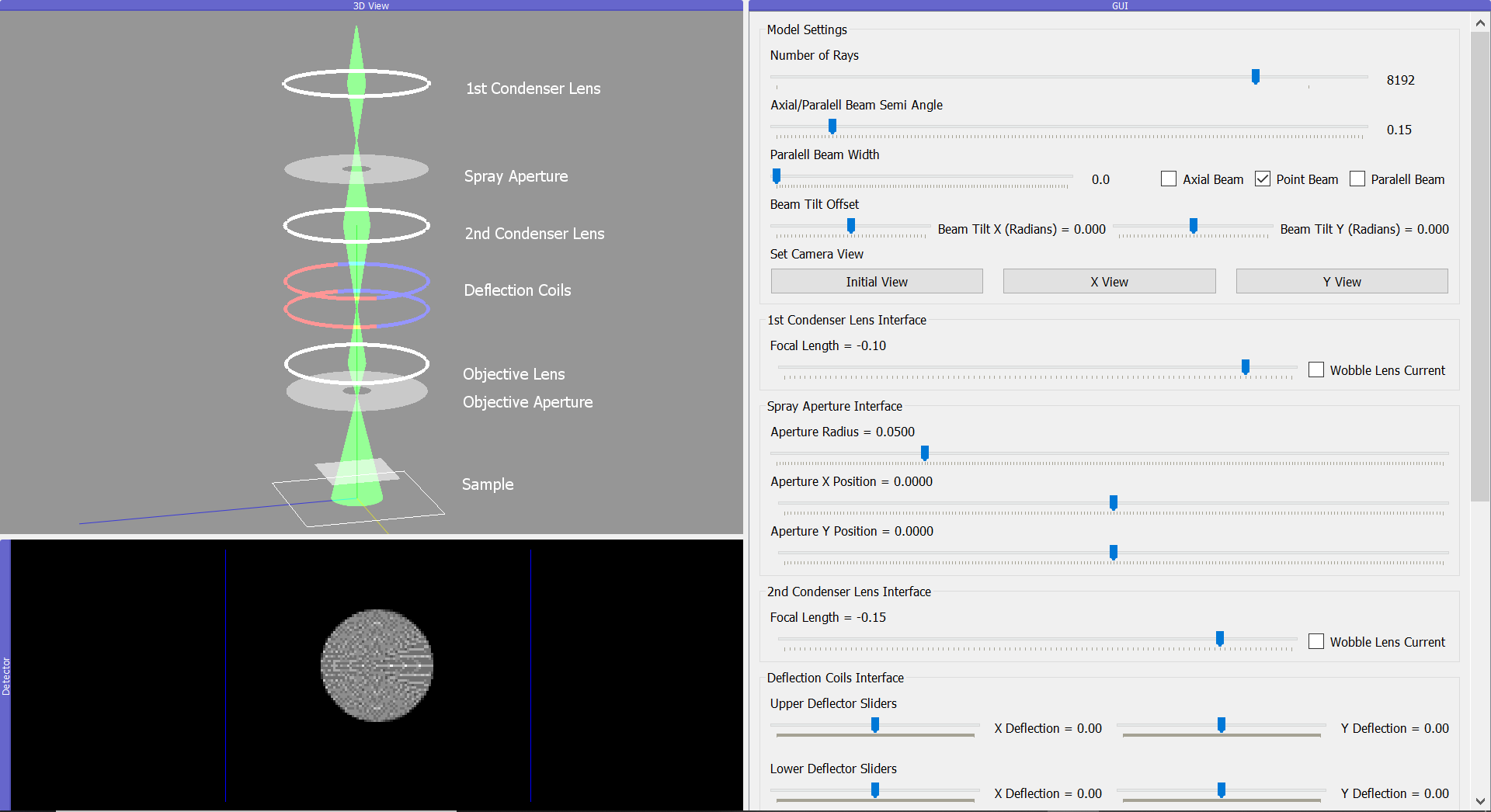
Also simply using a SEM schematic found on wikipedia, we can also easily recreate an alignment model of showing how the beam inside a scanning electron microscope operates.
from temgymbasic import components as comp
from temgymbasic.model import Model
from temgymbasic.run import run_pyqt
from PyQt5.QtWidgets import QApplication
import sys

def main():
    components = [comp.Lens(name = '1st Condenser Lens', z = 1.5, f = -0.1),
                  comp.Aperture(name = 'Spray Aperture', z = 1.2, aperture_radius_inner = 0.05),
                  comp.Lens(name = '2nd Condenser Lens', z = 1.0, f = -0.15),
                  comp.DoubleDeflector(name = 'Deflection Coils', z_up = 0.8, z_low = 0.7),
                  comp.Lens(name = 'Objective Lens', z = 0.5, f = -0.25),
                  comp.Aperture(name = 'Objective Aperture', z = 0.4, aperture_radius_inner = 0.05),
                  comp.Sample(name = 'Sample', z = 0.1)
                  ]

    model_ = Model(components, beam_z = 1.7, beam_type = 'point',
                       num_rays = 256, beam_semi_angle = 0.15)

    viewer = run_pyqt(model_)

    return viewer

if __name__ == '__main__':

    AppWindow = QApplication(sys.argv)

    viewer = main()
    viewer.show()
    AppWindow.exec_()